# Malangdo Costume Exchange & Enchantment

## **Overview**

Enchant your costumes in the latest update at Malangdo island (malangdo 115, 150).\
**Exchange costumes ➡️   Receive Enchantment Stones   ➡️ Enchant your Costume.**\
This system not only enhances your power but also increases the value of your costumes. If you’re ready, let’s explore the details below!

<figure><img src="/files/Sd3V6h7Gp1P8rEhlySfg" alt=""><figcaption><p>Malangdo</p></figcaption></figure>

## **Where to exchange Costumes and how?**

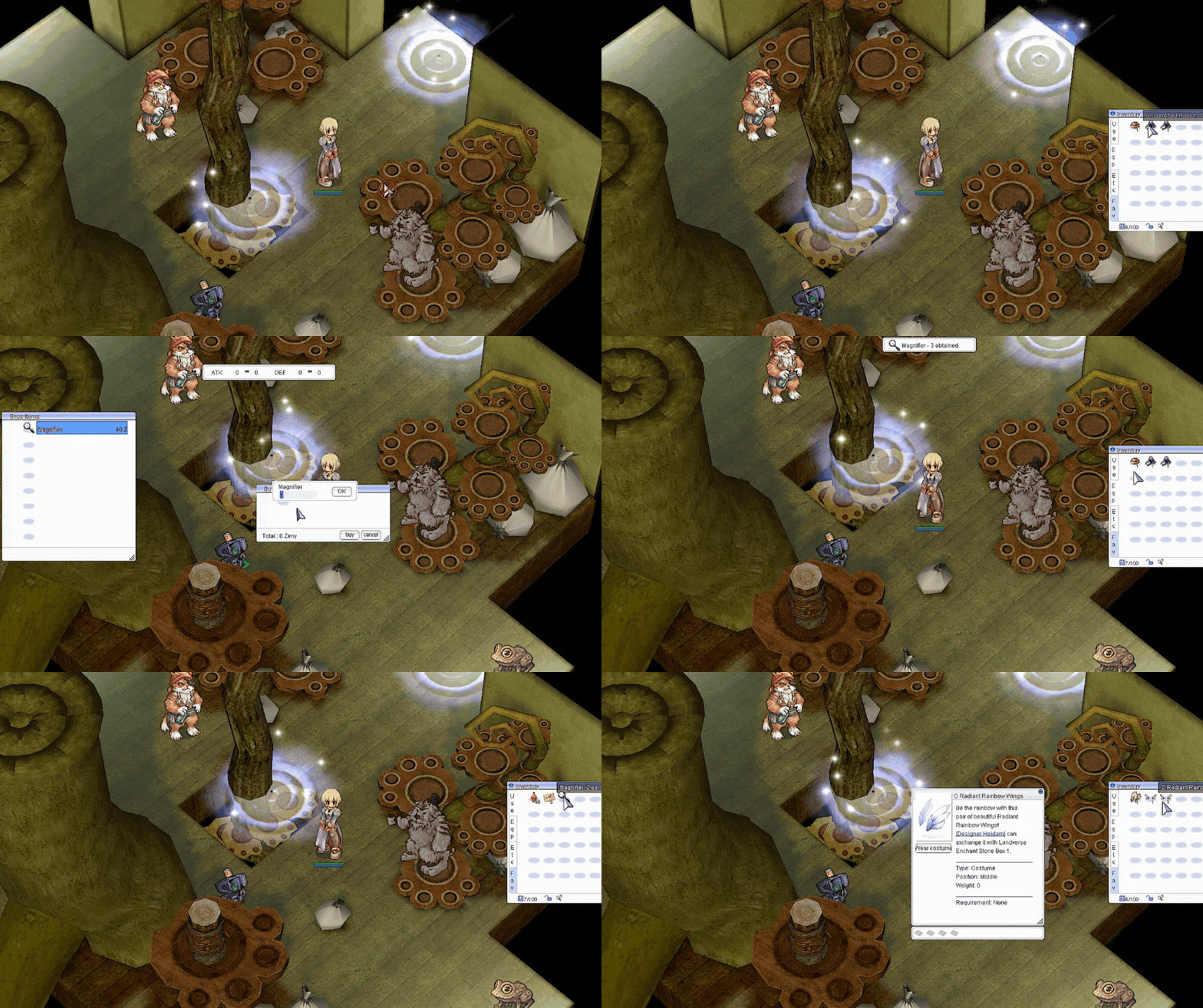
1. You can exchange 3 Silvervine Fruits![6417.png](https://irowiki.org/images/db/item/6417.png) for a random Malangdo Costume at Malangdo Island with NPC Designer Heidam. Simply navigate to /navi malangdo 116/151.

<figure><img src="/files/bwCiyXdt3CeUIlATD1Lw" alt=""><figcaption><p>Malangdo Exchange</p></figcaption></figure>

2. After obtaining a Mystery Malangdo Costume, you will need to use either the item Magnifier or the skill Item Appraisal to identify your costume.

<figure><img src="/files/kWri1MddW5tLs6TaHvP2" alt=""><figcaption><p>identify your costume.</p></figcaption></figure>

### **List of Malangdo Costumes**

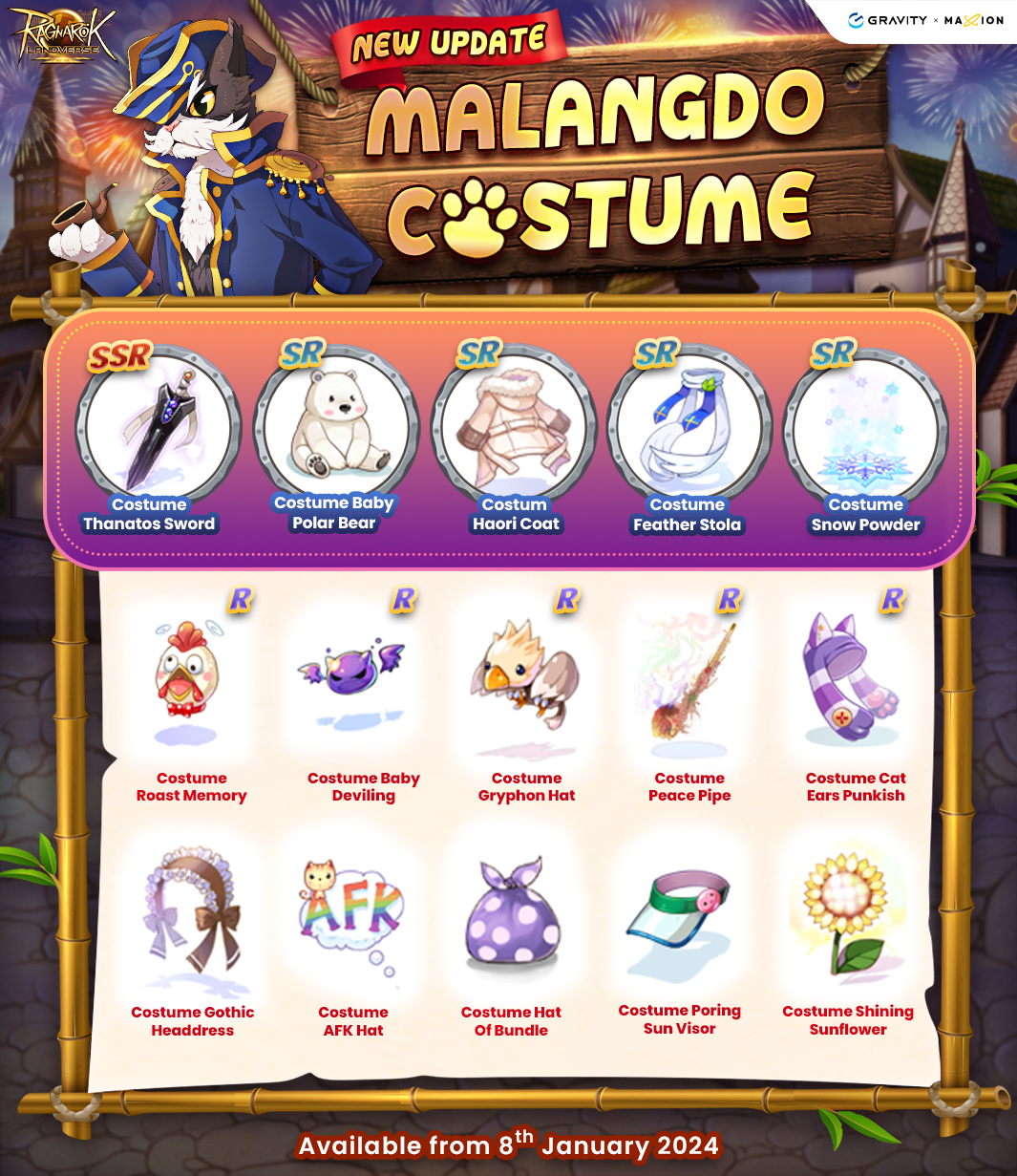
<figure><img src="/files/SKqCWUwgZdF5qIPidNiu" alt=""><figcaption><p>Malangdo Costume Season 1</p></figcaption></figure>

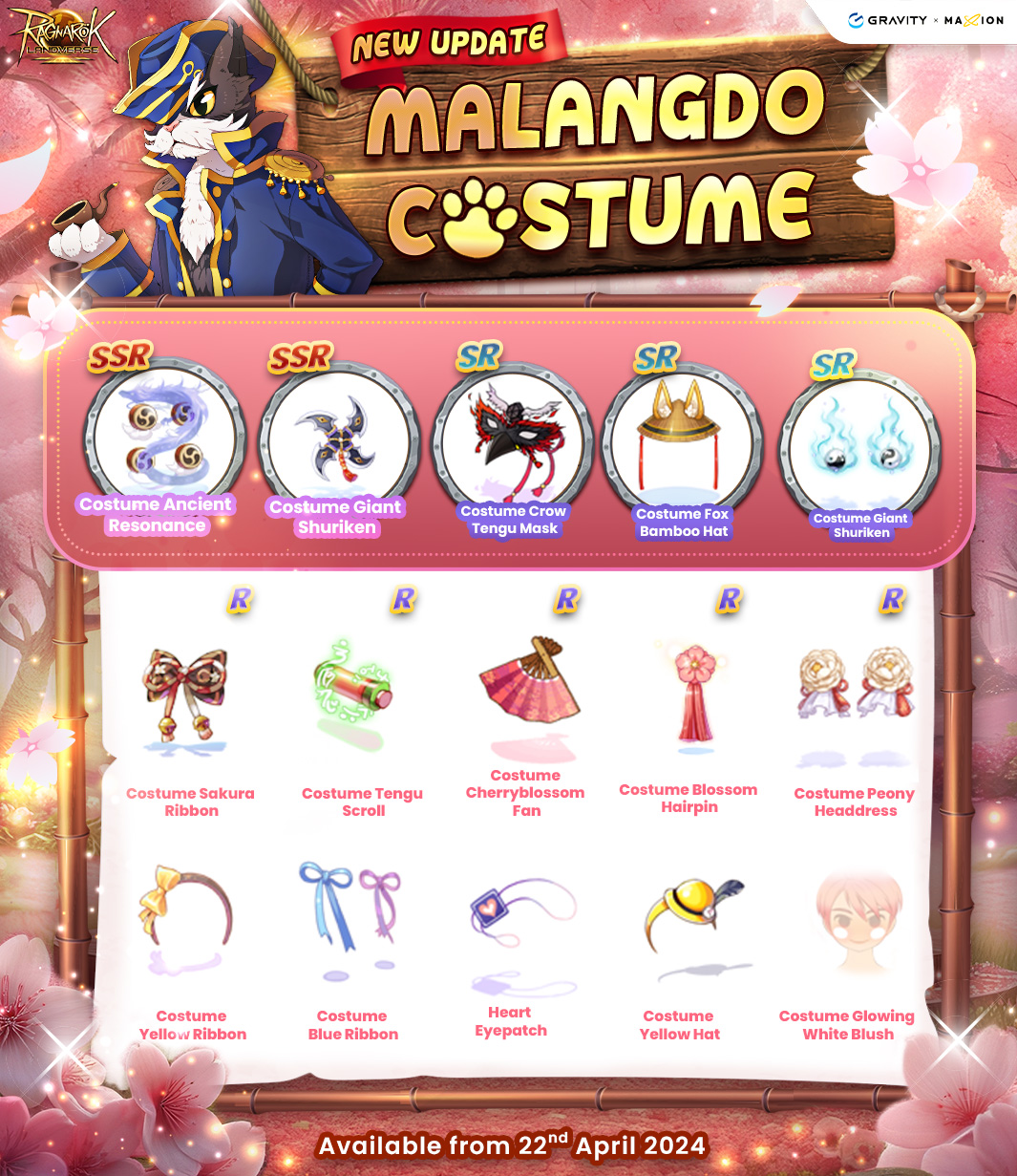
<figure><img src="/files/cfpiafxL9wFpKYHOUcYF" alt=""><figcaption><p>Malangdo Costume Season 2</p></figcaption></figure>

<figure><img src="/files/TlvkmMdksSXV6q882MJi" alt=""><figcaption><p>Malangdo Costume Season 3</p></figcaption></figure>

<figure><img src="/files/JSsCvGRpZrC2uAtllyY5" alt=""><figcaption><p>Malangdo Costume Season 4</p></figcaption></figure>

<figure><img src="/files/GbbR8aOOOMCtBBppmrE3" alt=""><figcaption><p>Malangdo Costume Season 5</p></figcaption></figure>

<figure><img src="/files/1Nz8o5SZQKfgfxeoIWCc" alt=""><figcaption><p>Enchant Costume.</p></figcaption></figure>

## **How to Enchanting a Costume ?**

<figure><img src="/files/V3g9Fl4ppbyZkcRxCtfL" alt=""><figcaption><p>Enchanting a Costume.</p></figcaption></figure>

Before starting the enhancement process for your costume, there are two key NPCs you must be aware of:

**NPC Aver De Dosh** (mal\_in01 22, 113): The NPC responsible for performing the enchantment on your **costume headgear.**

<figure><img src="/files/NmadXjlRjTy0ExYsKoJ7" alt=""><figcaption><p>Aver De Dosh</p></figcaption></figure>

**NPC Lace La Zard** (mal\_in01 20, 107): Handles the enchantment process for the **garment costume.**

<figure><img src="/files/PGobBbI7UsDVqTE0VLpc" alt=""><figcaption><p>Lace La Zard</p></figcaption></figure>

### Step-by-Step Enchanting Process

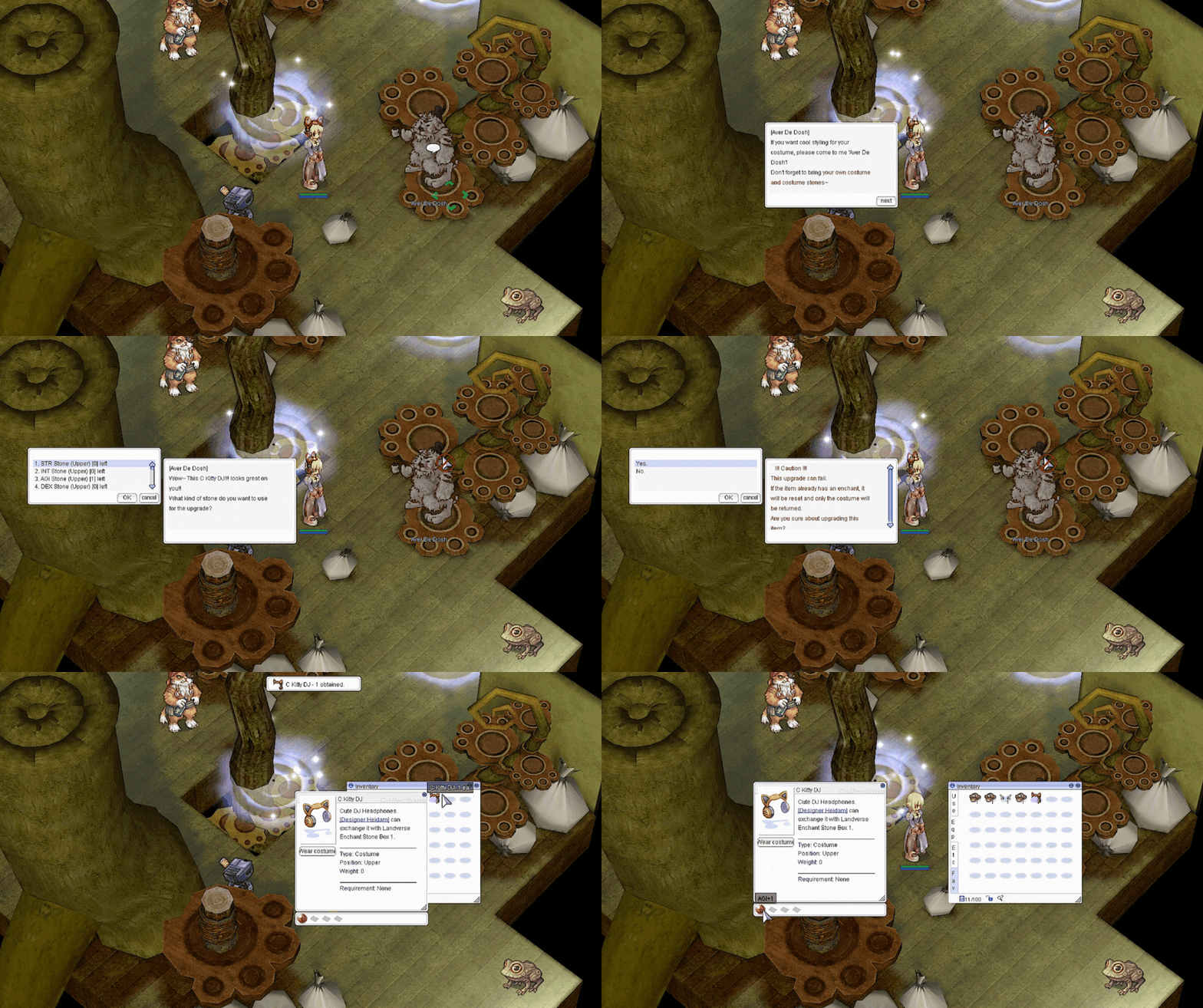
1. **Talk to Aver De Dosh or Lace La Zard** and select "Apply Enchant".

<figure><img src="/files/sooN7IMGe87IlEgwCDAx" alt=""><figcaption></figcaption></figure>

2. Choose your **Costumes** from the list.

<figure><img src="/files/dlRLZRiZqXh8SwLlKJgY" alt=""><figcaption></figcaption></figure>

3. Select the **Enchantment Stone** you want to use (e.g., "Attack Stone" for increased attack).

<figure><img src="/files/uOydEATro6Mh9kK5xlRm" alt=""><figcaption></figcaption></figure>

3. Confirm the enchantment&#x20;

<figure><img src="/files/nvHfpOGC0qe3yelrjSrd" alt=""><figcaption></figcaption></figure>

4. Enjoy your newly enchanted Costume Hat with improved stats!

<figure><img src="/files/s96Ls9FdyQbViXX54A9Q" alt=""><figcaption></figcaption></figure>

To enhance your costume, you need to equip the costume you want to enhance and have Costume Enchantment Stones prepared in your inventory.

\
Then, talk to either Aver De Dosh or Lace La Zard based on the costume you intend to enhance.

<mark style="color:red;">**※ Important notes for enhancement:**</mark>

* You can also check whether your costume is enchantable or not with the NPC without having Costume Enchantment Stones.
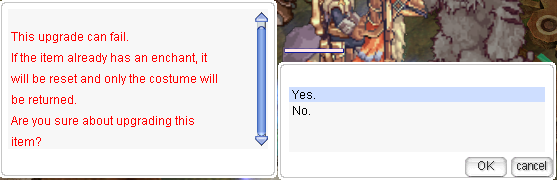
* The enhancement has a 50% chance of success/failure.
* Costumes that fail in enhancement will remain safe, and only the Enchantment Stones and effects that have already been enchanted will disappear.

### **Where to get Enchantment Stones?**

<figure><img src="/files/QWNliB0vWShwQkApzIzs" alt=""><figcaption><p>Exchange Enchant Stone Box</p></figcaption></figure>

You can obtain Enchantment Stones by exchanging costumes with **NPC Designer Heidam** (mal\_in01 20, 124). He will take a costume from your inventory, and in return, you will receive Enchant Stone Box.&#x20;

<mark style="color:red;">**※ Please be cautious and ensure your valuable costumes are stored safely before exchanging them.**</mark>

<figure><img src="/files/VCvqrot0gznSLUVF6Pso" alt=""><figcaption><p>Designer Heidam</p></figcaption></figure>

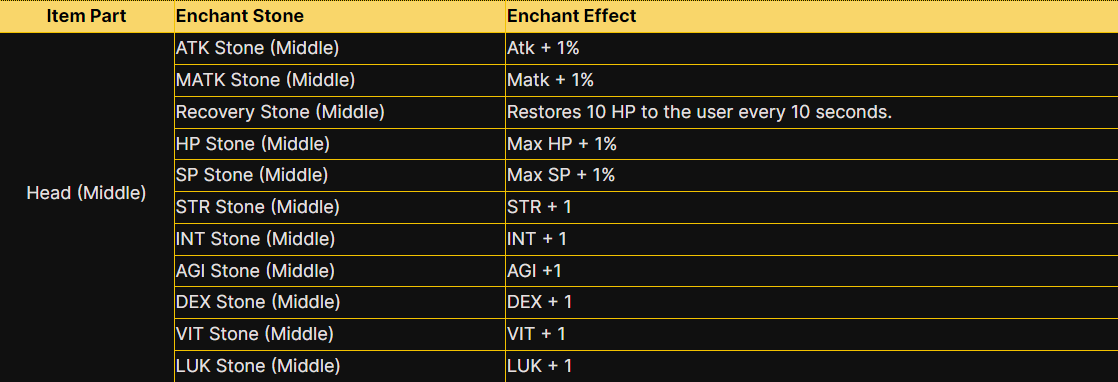
### **List of Enchantment Stones that you can get.**

<figure><img src="/files/rISGBKvPDKKHWUtmu6gL" alt=""><figcaption><p>Head (Upper)</p></figcaption></figure>

<figure><img src="/files/Z9zf3uS6dOzCfTs2hb2C" alt=""><figcaption><p>Head (Middle)</p></figcaption></figure>

<figure><img src="/files/8BWqREysnSOgb4dlVaPt" alt=""><figcaption><p>Head (Lower)</p></figcaption></figure>

<figure><img src="/files/DYFXs35oOMlxSu1cHXqy" alt=""><figcaption><p>Garment</p></figcaption></figure>


---

# Agent Instructions: Querying This Documentation

If you need additional information that is not directly available in this page, you can query the documentation dynamically by asking a question.

Perform an HTTP GET request on the current page URL with the `ask` query parameter:

```
GET https://maxion-1.gitbook.io/ragnarok-landverse-whitepaper/game-guide/character-progression/malangdo-costume-exchange-and-enchantment.md?ask=<question>
```

The question should be specific, self-contained, and written in natural language.
The response will contain a direct answer to the question and relevant excerpts and sources from the documentation.

Use this mechanism when the answer is not explicitly present in the current page, you need clarification or additional context, or you want to retrieve related documentation sections.